* Game Basics *Screen Icons
Field Screen
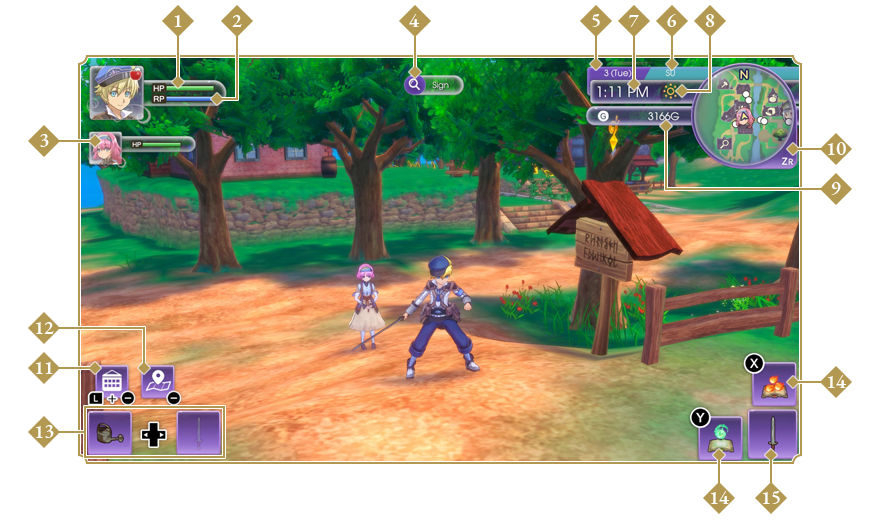
- HP Meter
- Displays your current HP (Hit Points). If this hits zero, you’ll faint and automatically wake up at Rigbarth Clinic.
- RP Meter
- Displays your current RP (Rune Points). Actions such as working with tools, creating items, and using magic or rune abilities all consume RP. If your RP hits zero, you’ll start consuming HP instead.
- Party HP Meters
- Displays the current HP of each party member. If this hits zero, they’ll fall unconscious.
- Information
- Displays the names of people, monsters, locations, and objects.
- Date and Day
- Displays the date and day of the week.
- Season
- Displays the current season.
- Time
- Displays the time. The date advances at midnight.
- Weather
- Displays the current weather.
 Sunny
Sunny Cloudy
 Rain
Rain Snow
Snow Typhoon
 Blizzard
 Starfall
  Runeys
 Night (Clear/Cloudy)
- Funds
- Displays the amount of gold you have.
- Mini-Map
- Displays your current location and the surrounding areas. Use the ZR Button to change the size of the mini-map.
- Calendar Icon
- Tap the icon or press the L Button and − Button simultaneously to open.
- Map Icon
- Tap the icon or use the − Button to open.
- Equipment
- Displays the farm tool and weapon you have equipped. Use the Left/Right Buttons to switch between them.
- Rune Abilities/Magic
- Displays the rune abilities and magic you have equipped.
- Weapon/Tool
- Displays the weapon or farm tool you have equipped.
Using the Map
Bring up the map with the − Button to see building and dungeon locations, as well as who is in what building. You can warp to previously visited locations with the Y Button. Select the diamond-shaped icons to warp around Rigbarth itself.
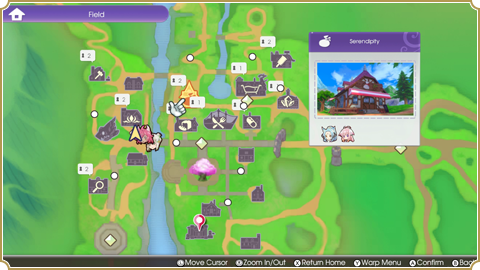
Press X to Go Home
Press the X Button on the map screen to warp from your current location to your room.
Camp Menu Screen
Press the + Button to open the Camp Menu and check your stats, items, requests, and game settings.
- Status
- Displays your stats and current amount of lumber/material stone. Also lets you check the L Pocket.
- Bag
- See your items, change your equipment, set rune abilities, and customize the L Pocket.
- Skills
- Displays your skill levels for different weapons, elements, and actions.
- Recipes
- Displays the recipes you can use to make food, equipment, and other items.
- Party
- Displays the current status of any party members or monster companions.
- Friendship Lv
- Displays the level of friendship you’ve achieved with the townsfolk and any tamed monsters.
- Ranger Notes
- Displays your requests and the next story-related objective, as well as any SEED crests or stamps you’ve collected.
- Save/Load
- Save your progress at a save point or load another file.
- Options
- Adjust the game’s volume, system settings, and controls.
Status Screen Icons
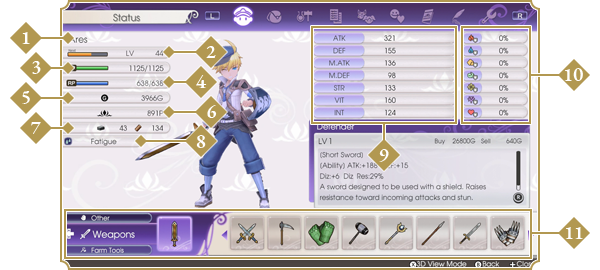
- Name
- Experience Points & Level
- HP/Max HP
- RP/Max RP
- Gold
- SEED Points
- Material Stone/Lumber
- Status Ailments
- Stats
- Resistances (Fire, Water, Earth, Wind, Light, Dark, Love)
- L Pocket
Using the L Pocket
Press the L Button on the field screen to open a shortcut known as the L Pocket. Customize the L Pocket on the Bag page to register weapons, farm tools, accessories, rune abilities, food, and various other items for easy access.
