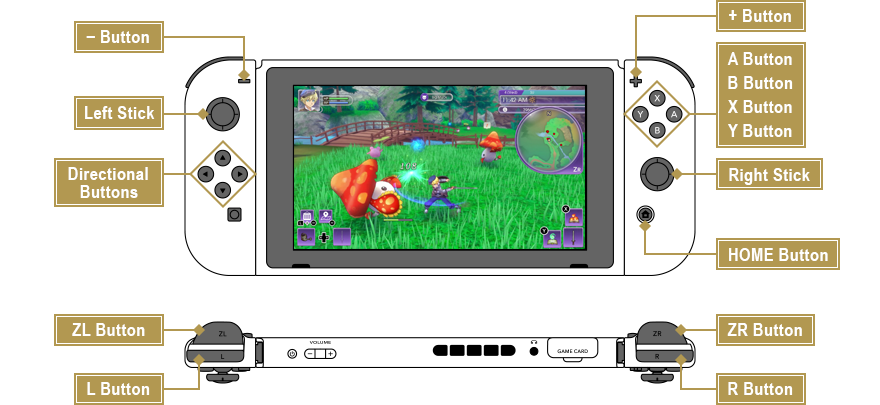
Field Controls
- Left Stick
- Run/Walk (while holding R Button)
- Directional Buttons
- Switch between farm tools (Left) and weapons (Right)
- A Button
- Talk/Check/Pick up (hold down to gather items of the same type)
- B Button
- Perform action
- X Button/Y Button
- Use rune abilities or magic
- L Button
- Open L Pocket/Begin a BTW conversation
- R Button
- Dash/Begin a BTW conversation
- ZL Button
- Throw spell seal/Connect with monster (press and hold)
- ZR Button
- Expand/Shrink the mini-map
- + Button
- Open Camp Menu
- − Button
- Open map
- Right Stick
- Control camera
- Right Stick (press down)
- Reset camera/Lock on
- L Button & − Button (press simultaneously)
- Open calendar
Battle Controls
- B Button
- Normal attack
- Right Stick (press down)
- Lock onto monster
- Tilt Right Stick Left/Right
- Change target
- Press B Button Repeatedly
- Combo attack
- Hold B Button
- Charge attack
- R Button
- Dash
- B Button While Dashing
- Dash attack (after increasing skill level)
- Dash Right Before Taking Damage
- Perfect dash (after increasing skill level)
- B Button During Perfect Dash
- Perfect dash attack (after increasing skill level)
- R Button & Left Stick Pressed Simultaneously
- Link attack (when character icon is flashing)
- X Button/Y Button/R Button & A, B, X, or Y Button Pressed Simultaneously
- Rune abilities/Magic
- B Button Pressed Repeatedly at End of Combo
- Ultimate attack
Menu Controls
- Left Stick/Directional Buttons
- Select category
- Right Stick
- Scroll through description
- A Button
- Confirm
- B Button
- Cancel
- X Button
- Sort items/3D view mode/Change order
- Y Button
- Equip items, weapons, armor etc.
- L Button/R Button
- Change category
- ZL Button/ZR Button
- Switch
- + Button
- Close menu